Find and explain the moments that matter in footage you won't upload — then export a cut. Drop a video, press Analyze: the app scores on your hardware, writes a highlight reel plus separate clips, and shows why each moment was picked. No upload. No subscription.
You do not have to learn the scoring model to get a cut. Analyze uses built-in defaults. Detailed settings stay one click away and are never rewritten by that run.
Drop an mp4, mov, mkv, or avi. Nothing is uploaded. The file stays on the disk you chose.
Short (~1–2 min), medium (~4 min), or longer (~7 min). That sets how much of the source makes the highlight.
Motion peaks and loudness are scored locally. Open the timeline, read the report, or ask why a moment was picked — then take the highlight reel and the separate clips folder.
Cloud highlight tools need a subscription because your footage pays for their GPU. VideoHighlighter runs detection, transcription, and composition on your machine — video, transcript, and models stay on disk. The timeline and report are the product: you see why a moment scored before you export.
A single license, not a monthly charge. The tool keeps working whether or not you renew anything.
No upload step. Client footage, unreleased cuts, and anything under NDA never leave the machine you chose. Analysis does not call a cloud model.
OpenVINO acceleration on Intel Arc, or any modern GPU. No render farm required.
Simple Analyze is the front door. This is what runs underneath when you want objects, faces, speech, or search — still on your machine, in order.
YOLOX object detection running on OpenVINO, combined with optical flow, finds people, movement, and action across every frame — the raw signal everything downstream is built on.
YuNet + SFace (OpenCV Zoo) tracks identity across a cut so the same person stays tagged scene to scene — find every moment someone appears in, or mark a person to avoid so clips containing them stay out of the edit.
Whisper transcribes dialogue and narration locally, giving you a searchable, timestamped script tied directly to the timeline.
Reads spatial relationships between detected subjects to flag actual events — not just motion, but who's doing what, where, relative to whom.
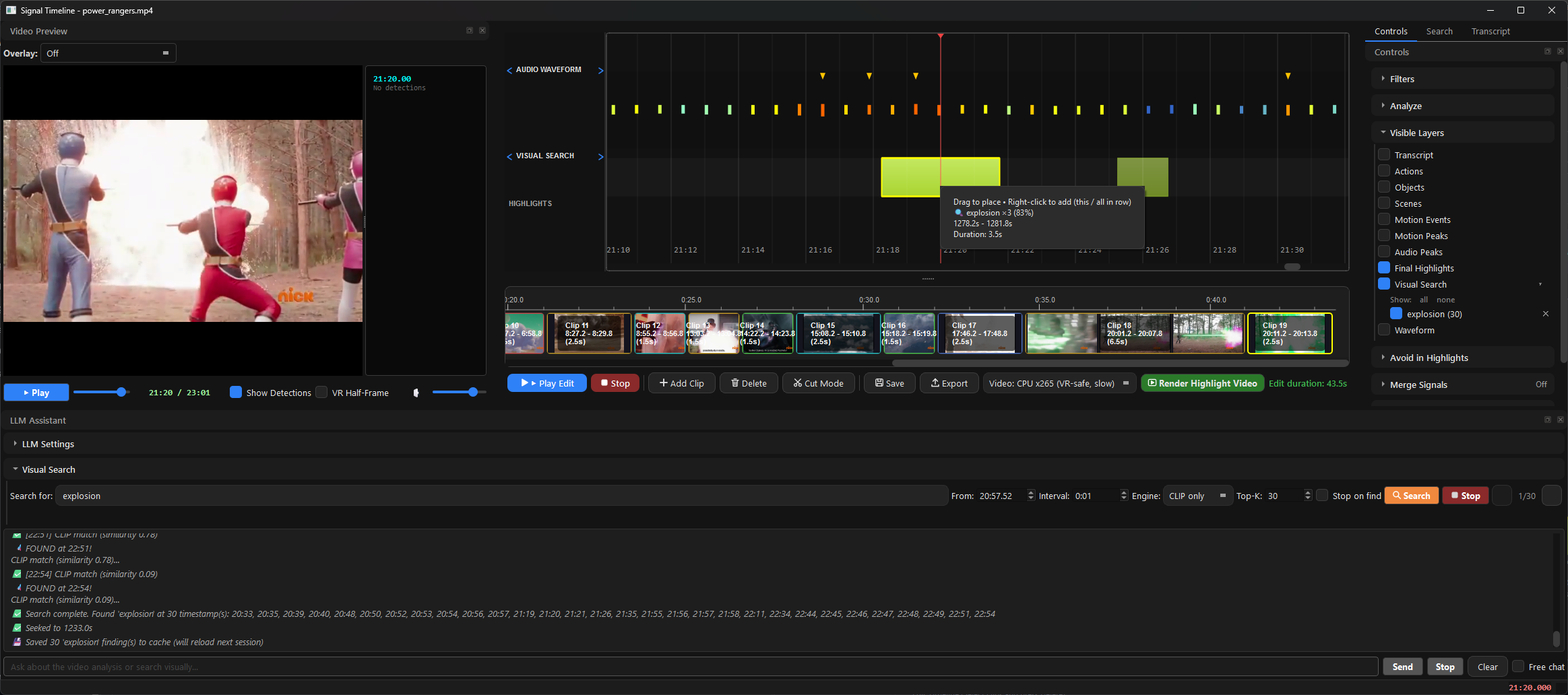
CLIP-based search lets you find a moment by describing it — "the handshake," "the empty stage" — instead of scrubbing the whole timeline by eye.
A PySide6 editor separates the raw detection signal from your final cut, so you can review what the pipeline found before deciding what makes the edit.
This is not a shorts factory that uploads your file and returns a black-box cut. The pipeline surfaces reviewable signals — teach it what to look for, open the timeline and report, then export a reel and separate clips. Every build ships free and open-source on GitHub first.
The analysis, the report and the reasons behind every cut are free and open-source, and they stay that way. Pro is for when the fixed vocabulary runs out: teach it what you are looking for from your own examples, watch it live, and hold a commercial licence for the work.
| Feature | Free | Pro |
|---|---|---|
| Scene, motion & audio detection | ✓ | ✓ |
| Object detection & action recognition | ✓ | ✓ |
| Transcription & subtitles (Whisper) | ✓ | ✓ |
| Natural-language visual search | ✓ | ✓ |
| Face recognition & identity avoid | ✓ | ✓ |
| VR side-by-side mode & VR-safe rendering | ✓ | ✓ |
| Fully offline · prebuilt app | ✓ | ✓ |
| Live object & action overlay — during playback | — | ✓ |
| Teach a category by pointing — no training | — | ✓ |
| Search by example — “find more like this” | — | ✓ |
| Open-vocabulary detection — type any object | — | ✓ |
| Counter / scoreboard detection | — | ✓ |
| Commercial license (no AGPL) | — | ✓ |
| Priority support & updates | — | ✓ |
| Price | Free · AGPL | $49 · one-time |
The free edition is open-source on GitHub. Pro is a proprietary build for commercial use.
Your key arrives with the receipt. Activate it once, and from then on it is checked entirely on your machine — no account, no subscription, nothing phoning home.
Everything in the free version, plus:
Use it on up to 5 computers — a desktop and a laptop are no problem. Activation needs an internet connection once; after that the licence is checked entirely on your own machine and the app never contacts us again. Replacing a computer, or reinstalling Windows? Email me and I'll free the slot, at no charge. No internet at all? Ask about an offline key.
Need a detector trained on your own domain — a custom YOLOX/OpenVINO pack, invoiced separately? Email us. Not sold through checkout.
Short answers. If yours is missing, Discord or email is the same two people who built it.
No. Video files, transcripts, detections, and local models stay on disk. Analysis, search, and export never upload footage. The only network calls Pro makes are a one-time license activation with Lemon Squeezy, and an optional anonymous check for a newer build (a GET of a public JSON file — no key, no machine id).
The prebuilt app you should download today is Windows. macOS is coming: the build already exists and ships as a .dmg on the free releases, but it is not yet notarised with Apple, so the first launch trips Gatekeeper and needs a manual step. We are not calling macOS supported — or selling it — until that download opens by double-clicking it like any other app. Linux runs from source if you know the stack; we do not sell that as a product.
No. A GPU (including Intel Arc via OpenVINO) makes detection faster. A current CPU still runs the pipeline. There is no cloud render farm and no upload fallback.
Free is a Windows Setup.exe from GitHub Releases — run it; it downloads and unpacks the rest (unsigned, so SmartScreen may ask More info → Run anyway). Pro is a single offline installer from the Download Pro button (same file as your Lemon Squeezy order). Models ship inside the build; you do not fetch them from us at runtime. The installer is unsigned, so SmartScreen may ask the same one-time step.
Everything that finds a moment and everything that explains one is in both, deliberately — a report you cannot interrogate is the thing this exists instead of, so we do not charge for the answer to "why did it pick that". What Pro adds is a vocabulary of your own: teach a category from example frames, search by example, type an object nobody trained a model for, and see it all live during playback. Plus a commercial licence (no AGPL) and priority support. See the table above. Price is $49, once.
Your receipt includes a UUID key. Paste it once while online; after that the app checks the license on disk and does not need the internet. Up to 5 computers. Replacing a machine: email and the slot is freed. No account, no subscription.
That is a services job — custom YOLOX/OpenVINO training, invoiced by bank transfer, not sold through Lemon Squeezy. Email us with what you need to find in the footage.
Discord, or email przkreft@gmail.com or meric.donmezer@gmail.com. After a Pro purchase, the same addresses — there is no ticket portal.
Windows 10/11 · GPU optional · internet once to activate Pro · footage never uploaded
Free and open-source at the core. Pro adds live tools, a commercial license, and support.
